• Sign Up! To view all forums and unlock additional cool features

    Welcome to the #1 Explorer ST Forum and Explorer ST community dedicated to Explorer ST owners and enthusiasts. Register for an account, it's free and it's easy, so don't hesitate to join the Explorer ST Forum today!


Speaker sizes for 14 speaker system…

OP
-REDRUM-
Messages
218
Reactions
154
Points
37
Location
Omaha, NE, USA
Vehicle
2020 Explorer ST
Thread Starter #22
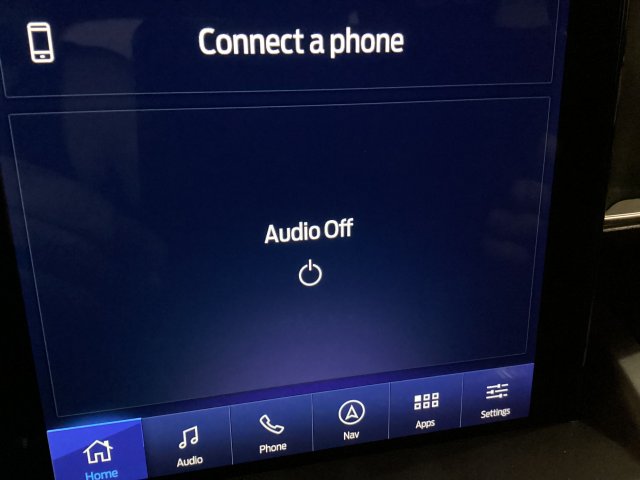
Okay guys… I need your help! Got everything installed and wired up but it won’t turn on? The radio says “power off” and won’t turn on. I have 12v at the LC2i and both amps… I have checked the fuses mentioned in other posts (amp fuses #115 and #127 & ACM fuse #32) and all are good. Does the LC2i need a remote in? I figured it would auto sense… Any guidance would be greatly appreciated!
 

Messages
2,031
Reactions
1,423
Points
352
Location
Chicago, IL, USA
#23
Okay guys… I need your help! Got everything installed and wired up but it won’t turn on? The radio says “power off” and won’t turn on. I have 12v at the LC2i and both amps… I have checked the fuses mentioned in other posts (amp fuses #115 and #127 & ACM fuse #32) and all are good. Does the LC2i need a remote in? I figured it would auto sense… Any guidance would be greatly appreciated!
You saying the oem head unit will not turn on?


Sent from my iPad using Tapatalk
 

OP
-REDRUM-
Messages
218
Reactions
154
Points
37
Location
Omaha, NE, USA
Vehicle
2020 Explorer ST
Thread Starter #24
It turns on but the radio doesn’t turn on… it just stays audio off.
 

Attachments

Cruising68

2000 Post Club
Messages
2,031
Reactions
1,423
Points
352
Location
Chicago, IL, USA
#25
It turns on but the radio doesn’t turn on… it just stays audio off.
Gotta be a loose wire somewhere imo. I assume pushing the on/off button sends a signal over the can bus to the oem amp telling it to turn on.

I used a Zen unit to tap all the channels so two plugs to plug in and the wiring from the amp was done.


Sent from my iPhone using Tapatalk
 

Cdubya

2000 Post Club
Messages
2,020
Reactions
1,024
Points
352
Location
NE Ohio
Vehicle
2026 Explorer ST
#26
If your audio won't turn on in Sync, it has nothing to do with the LC2i which has auto-turn-on by default. It sounds like your ACM isn't working. Can you pull codes? Did you mess with that at all? Where did you pull you signal from?
 

OP
-REDRUM-
Messages
218
Reactions
154
Points
37
Location
Omaha, NE, USA
Vehicle
2020 Explorer ST
Thread Starter #27
I only have my ZFG tuner to check codes and there weren’t any that it saw. I pulled my source wires from the sub inputs and ran those to my LC2i. When I plug the power in to the controller the yellow “maximized” light will come on for a second and then turn off. I can get the “power“ light to come on if I do a 12v jumper in to the controller but the radio still does not come on? I will redo my lead wires to make sure they are correct and properly joined.
 

OP
-REDRUM-
Messages
218
Reactions
154
Points
37
Location
Omaha, NE, USA
Vehicle
2020 Explorer ST
Thread Starter #28
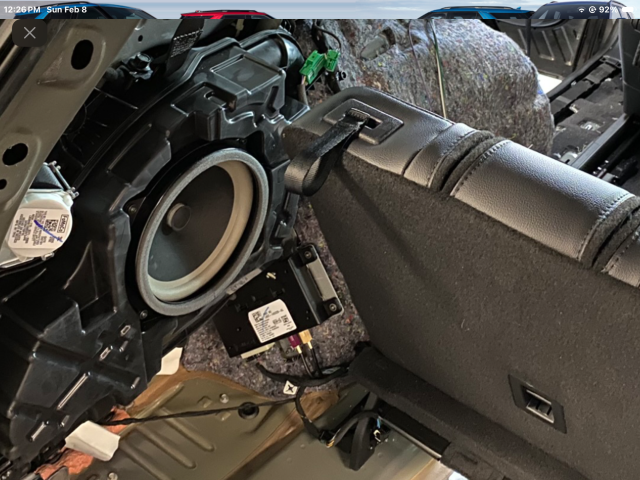
So I re-did the connectors from the sub input wires to the LC2i and made sure the were + to + and - to -… same thing radio says searching and then goes to audio off. What is the box below the sub inputs to this picture and do I need to disconnect the tan and maroon connectors?
 

Attachments

Cdubya

2000 Post Club
Messages
2,020
Reactions
1,024
Points
352
Location
NE Ohio
Vehicle
2026 Explorer ST
#29
When "audio off" is displayed on Sync, it has nothing to do with your LC2i at all since those are completely separate from the infotainment. Maybe try rebooting sync or even pulling the battery ground for the car to reboot.
 

OP
-REDRUM-
Messages
218
Reactions
154
Points
37
Location
Omaha, NE, USA
Vehicle
2020 Explorer ST
Thread Starter #30
I pulled the negative and waited 30 seconds and reconnected. Still says audio off… when you say rebooting sync do you mean do a factory reset? If not how do I reboot it? Couldn’t find that as an option in the menus.
 

Cdubya

2000 Post Club
Messages
2,020
Reactions
1,024
Points
352
Location
NE Ohio
Vehicle
2026 Explorer ST
#31
If you are just taking signal from the subwoofer input, then the system is almost complete separate from. I say almost because it can detect if the speakers are not connected. Maybe the ACM detects no speakers are connected and is not even attempting to play. But the real problem is that your Sync is saying "audio off" and not with the LC2i which is probably not turning on because it has no input signal to turn it on. May do a scan with Forscan? If I temporarily disconnect a speaker, it will log that the speaker is not connected.
 

UNBROKEN

5000 Post Club
Messages
5,557
Reactions
6,701
Points
352
Location
Houston, TX, USA
#32
Make sure you didn’t knock a plug loose on anything in that area. If the factory amp doesn’t kick on the radio will display Audio Off.
 

OP
-REDRUM-
Messages
218
Reactions
154
Points
37
Location
Omaha, NE, USA
Vehicle
2020 Explorer ST
Thread Starter #33
I don’t have forscan unfortunately, what does it cost? At this point I may as well buy it so I can make other updates.
 

OP
-REDRUM-
Messages
218
Reactions
154
Points
37
Location
Omaha, NE, USA
Vehicle
2020 Explorer ST
Thread Starter #34
Make sure you didn’t knock a plug loose on anything in that area. If the factory amp doesn’t kick on the radio will display Audio Off.
I removed the factory amp from behind the sub enclosure and ran new amps. I don’t see anything else back there.
 

Cdubya

2000 Post Club
Messages
2,020
Reactions
1,024
Points
352
Location
NE Ohio
Vehicle
2026 Explorer ST
#35
If you want a Quick Forscan setup for diagnostics, get an OBDLink MX+ and get Forscan Lite on iOS or android.

But with what you did, there should be no reason for "audio off".
 

Cdubya

2000 Post Club
Messages
2,020
Reactions
1,024
Points
352
Location
NE Ohio
Vehicle
2026 Explorer ST
#36
Pretty sure you need to leave the factory electronics intact: ACM, DSP/Amp
 

OP
-REDRUM-
Messages
218
Reactions
154
Points
37
Location
Omaha, NE, USA
Vehicle
2020 Explorer ST
Thread Starter #37
If you want a Quick Forscan setup for diagnostics, get an OBDLink MX+ and get Forscan Lite on iOS or android.

But with what you did, there should be no reason for "audio off".
would this allow me to modify other settings like amber DRL’s and turning off double honk?
 

OP
-REDRUM-
Messages
218
Reactions
154
Points
37
Location
Omaha, NE, USA
Vehicle
2020 Explorer ST
Thread Starter #38
Pretty sure you need to leave the factory electronics intact: ACM, DSP/Amp
Well if that’s the case then that is the issue… I will put the amp back in and see if that works.
 

Cdubya

2000 Post Club
Messages
2,020
Reactions
1,024
Points
352
Location
NE Ohio
Vehicle
2026 Explorer ST
#39
would this allow me to modify other settings like amber DRL’s and turning off double honk?
Not with Forscan Lite but you can use the dongle with a Win laptop and Forscan you download. Just get a trial subscription or pay for one.
 

UNBROKEN

5000 Post Club
Messages
5,557
Reactions
6,701
Points
352
Location
Houston, TX, USA
#40
Plug the factory amp back in. If you removed everything and added amps and only used an LC2i you did about half the job. You should have used an actual interface to remove the amp but keep all your chimes and such. You would also have a better input signal than just tapping a few wires.


Top