
-
Sign Up! To view all forums and unlock additional cool features
Welcome to the #1 Explorer ST Forum and Explorer ST community dedicated to Explorer ST owners and enthusiasts. Register for an account, it's free and it's easy, so don't hesitate to join the Explorer ST Forum today!
NOW POSSIBLE - Amber DRL/LED bars at nighttime!
- Thread starter Nightshade
- Start date

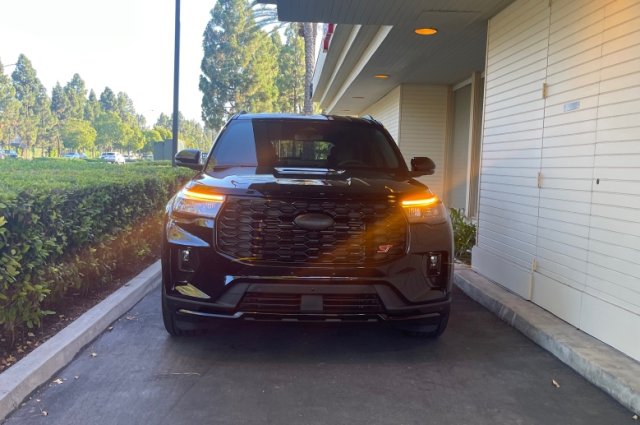
Thanks for the write up, it worked well on my (job 3) 2025!
Just one note for those coming after me: it says "Using DRL with fog lamp” -> change to “Enable” but I didn't see an "enable/disable" option. Instead, it was "allowed/inhibited". The setting was originally "inhibited", setting it to "allowed" made it work for me.
Just one note for those coming after me: it says "Using DRL with fog lamp” -> change to “Enable” but I didn't see an "enable/disable" option. Instead, it was "allowed/inhibited". The setting was originally "inhibited", setting it to "allowed" made it work for me.


So I was able to to get the amber lights. However, they work only during the day and while in Drive. What am I missing here?
-
 1
1
- Show All
You have a 2023? There's a separate set of instructions for 2020-2024.
I ended up trying it as written. Not working for me. Tried it a number of times. The white DRL bar will not turn off.
The ambers work as described as turn signals and DRL and go off at night with the low beams, but the white DRL bar is always lit
If i set "Front DRL Lamp Usage" to the following, i get:
Position only = full brightness white DRL bar with the ambers on
Fixed Position = very dimly lit white DRL bar with the ambers on
My ST is a Canadian build, so those two lines of code in the beginning were already set to what was written. Didn't need to make any changes there. I wonder if i need to make a change elsewhere to get this functional.
Ended up putting the DRL back to original config until I can figure out what I am missing.
Last edited:
First off--for those who know me, know that I'm a FORScan guru/pro between 2021+ F-150s and 2020+ Explorers! Those who don't know me, I'm the guy who created + maintains the official FORScan spreadsheets and have been spending more time on the Explorer side this time. I've noticed on the Explorer side of FORScan (between Facebook group and online forums), a lot of people haven't worked with FORScan on Explorers because the demand isn't that high, like it is for the F-150s. I'm here to help fix and boost that!
I understand after reading TONS of threads on forums and posts on Facebook groups for Explorers, many are asking one repeated question--"Can you use amber DRL/LED bars during the day, can be enabled during nighttime and in drive?". Up until now, no one has found anything but there has to be a way, right? To answer that, YES! After looking hard into this during my breaks at work, I have FINALLY found a way to allow you to use amber DRLS/LED bars at night, even with fog lights if you want to!
1. Make sure your Amber DRL changes are done in FORScan as below:
Side note: US Explorer owners do not have DRL enabled as default from factory. Change the below in BdyCM (asbuilt) first. Back up your BdyCM module before writing the changes. Write each change individually:
2. OPTIONAL: Once you've confirmed your amber LED bars work and rear brake markers are on, if you'd like to use the fog lights with your amber DRLs by operating off the fog light on/of switch, follow the next steps below:
3. Once the above is done, verify again put a dark cloth or anything dark to cover the auto headlamps sensor in the middle of the dash, if attempting this during the day.
4. Keep your auto headlamps sensor still covered (if it's not dark/night time yet outside). Put your headlight switch knob in Mode 2 (parking mode) and verify your amber LED bars come on then check your tails and make sure the red markers are on. Once confirmed, push the button on your headlight switch to enable fog lights if you want them on at night too with your amber DRL bars!
5. You're done! --If you want to use your low beams again at night for lets say highways or etc, just switch it back to Mode 3 (auto) of your headlight switch and it'll go back to normal as if it was from factory. Whenever you'd like to use your amber LED bars at night, just switch to Mode 2 (marker) of your headlight switch!
This was a long time coming and finally able to help with the Explorer community with enable amber LED bars at night If you have any questions, comment on this thread or send me a DM! Cheers!
Big time appreciation to this forum members, @Perq and @22Atlas22, to lend me a hand quickly with this today!
EDIT: Big thanks to @powerboatr for attempting this on his 2024, it works! Confirmed working for 2020-2024s as well.
Disclaimer: Do at your own risk.
View attachment 29446
View attachment 29447 View attachment 29448
I understand after reading TONS of threads on forums and posts on Facebook groups for Explorers, many are asking one repeated question--"Can you use amber DRL/LED bars during the day, can be enabled during nighttime and in drive?". Up until now, no one has found anything but there has to be a way, right? To answer that, YES! After looking hard into this during my breaks at work, I have FINALLY found a way to allow you to use amber DRLS/LED bars at night, even with fog lights if you want to!
**Keep in mind, this will be the amber LED bars to be enabled during the night time with low beams off in drive, to copy exactly during the day but to be used at night. This won't enable amber led bars for night time mode together with low beams and won't work in when in park (exactly the same as daytime). This is due to a hardware/headlight limitation, not software.
Here are the steps to do and I cannot stress this enough, please backup your BdyCM module the first time below BEFORE writing them to the Explorer, just to be on the safe side.
1. Make sure your Amber DRL changes are done in FORScan as below:
- BdyCM (as-built) -> 726-42-01 -> x4x4-xxxx-xx-- -> Sets the White DRL to fixed position (Turns off when the car is in normal drive mode during daytime)
- BdyCM (as-built) -> 726-43-01 -> x1x1-xxxx-xx-- -> Sets Turn to Turn and DRL (Amber LED bars on as DRL instead of white LED bars)
Side note: US Explorer owners do not have DRL enabled as default from factory. Change the below in BdyCM (asbuilt) first. Back up your BdyCM module before writing the changes. Write each change individually:
- BdyCM 726-21-01 -> 0202-0202 02—
- BdyCM 726-27-02 -> xx02-xxxx-xx--
2. OPTIONAL: Once you've confirmed your amber LED bars work and rear brake markers are on, if you'd like to use the fog lights with your amber DRLs by operating off the fog light on/of switch, follow the next steps below:
- BdyCM (easy way) -> search for "DRL include Park Lamps -> change to "Enable".
- BdyCM (easy way) -> search for " Using DRL with fog lamp” -> change to “Enable”.
- BdyCM (easy way) -> search for "Left Front Fog Lamp Usage" -> change to "Fog, DRL, and Cornering".
- BdyCM (easy way) -> search for "Right Front Fog Lamp Usage" -> change to "Fog, DRL, and Cornering".
3. Once the above is done, verify again put a dark cloth or anything dark to cover the auto headlamps sensor in the middle of the dash, if attempting this during the day.
4. Keep your auto headlamps sensor still covered (if it's not dark/night time yet outside). Put your headlight switch knob in Mode 2 (parking mode) and verify your amber LED bars come on then check your tails and make sure the red markers are on. Once confirmed, push the button on your headlight switch to enable fog lights if you want them on at night too with your amber DRL bars!
5. You're done! --If you want to use your low beams again at night for lets say highways or etc, just switch it back to Mode 3 (auto) of your headlight switch and it'll go back to normal as if it was from factory. Whenever you'd like to use your amber LED bars at night, just switch to Mode 2 (marker) of your headlight switch!
This was a long time coming and finally able to help with the Explorer community with enable amber LED bars at night If you have any questions, comment on this thread or send me a DM! Cheers!
Big time appreciation to this forum members, @Perq and @22Atlas22, to lend me a hand quickly with this today!
EDIT: Big thanks to @powerboatr for attempting this on his 2024, it works! Confirmed working for 2020-2024s as well.
Disclaimer: Do at your own risk.
View attachment 29446
View attachment 29447 View attachment 29448
- BdyCM (as-built) -> 726-42-01 -> x4x4-xxxx-xx
- BdyCM (as-built) -> 726-43-01 -> x1x1-xxxx-xx
- BdyCM 726-21-01 -> 0202-0202 02—
- BdyCM 726-27-02 -> xx02-xxxx-xx--
Explorer ST Posts
-

-

-

-

-

-

-

-

-
 Replaced the lugnuts to solid black one
- Latest: Fordsoldier