• Sign Up! To view all forums and unlock additional cool features

    Welcome to the #1 Explorer ST Forum and Explorer ST community dedicated to Explorer ST owners and enthusiasts. Register for an account, it's free and it's easy, so don't hesitate to join the Explorer ST Forum today!


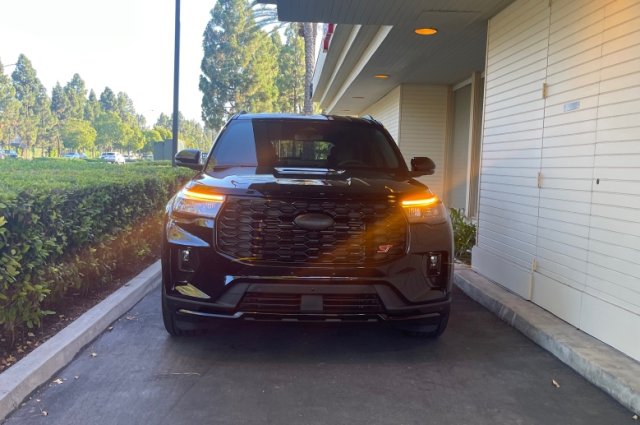
NOW POSSIBLE - Amber DRL/LED bars at nighttime!

Messages
126
Reactions
125
Points
37
Location
SoCal
Vehicle
2025 ST
#21
Thanks for all your work!

ambers.jpg
 

Brandyn M

New Member
Messages
2
Reactions
1
Points
2
Location
Pocatello, ID
Vehicle
2025 Ford Explorer ST
#22
Works great on my 25! Thanks again!
 

Messages
14
Reactions
10
Points
2
Location
Phoenix, AZ, USA
#23
Worked perfectly on my 26! I was one of the ones that had DRLs disabled from factory, once I updated that the ambers worked as DRLs. Appreciate the tutorial!
 

svache

New Member
Messages
15
Reactions
6
Points
2
Location
Hawaii
Vehicle
2025 Explorer ST
#24
Thanks for the write up, it worked well on my (job 3) 2025!

Just one note for those coming after me: it says "Using DRL with fog lamp” -> change to “Enable” but I didn't see an "enable/disable" option. Instead, it was "allowed/inhibited". The setting was originally "inhibited", setting it to "allowed" made it work for me.
 

Combatvet

Member
U.S. Army Veteran
Messages
279
Reactions
123
Points
37
Location
Texas
Vehicle
2025 Explorer ST
#25
So still no amber at night with the headlights on, correct?
 

Gadgtfreek

Active Member
Messages
515
Reactions
229
Points
52
Location
Mobile, Alabama
Vehicle
2025 Explorer ST 4WD
#26
Just ordered the OBD adapter and downloaded the SW. Gonna change to Amber next week, it just looks so much better.
 

Messages
18
Reactions
4
Points
2
Location
Palos Hills, IL
Vehicle
2025 For Explorer St
#27
So I was able to to get the amber lights. However, they work only during the day and while in Drive. What am I missing here?
 

Cdubya

2000 Post Club
Messages
2,138
Reactions
1,085
Points
352
Location
NE Ohio
Vehicle
2026 Explorer ST
#28
So I was able to to get the amber lights. However, they work only during the day and while in Drive. What am I missing here?
You can switch it to parking lights and it will display only the amber DRL (not headlights) and you can add fog lights to that by hitting the foglight button. You cannot drive at night with headlights and amber DRL at the same time.
 

Messages
18
Reactions
4
Points
2
Location
Palos Hills, IL
Vehicle
2025 For Explorer St
#29
You can switch it to parking lights and it will display only the amber DRL (not headlights) and you can add fog lights to that by hitting the foglight button. You cannot drive at night with headlights and amber DRL at the same time.
Parking lights turns them white. ‍
 

Cdubya

2000 Post Club
Messages
2,138
Reactions
1,085
Points
352
Location
NE Ohio
Vehicle
2026 Explorer ST
#30
Parking lights turns them white. ‍
I believe you have to be in a drive mode. Are you in Park? Otherwise, something didn't go as intended.
 

Messages
515
Reactions
229
Points
52
Location
Mobile, Alabama
Vehicle
2025 Explorer ST 4WD
#31
Mine are amber in drive, off in park (daytime). White with head lights on.
 

Messages
18
Reactions
4
Points
2
Location
Palos Hills, IL
Vehicle
2025 For Explorer St
#32
I believe you have to be in a drive mode. Are you in Park? Otherwise, something didn't go as intended.
Possible. In Drive, lights on auto, amber.
In Drive, switch over to park lights, turns white.
 

Messages
364
Reactions
181
Points
37
Location
Massachusetts
Vehicle
2023 ST
#33
Side note: US Explorer owners do not have DRL enabled as default from factory. Change the below in BdyCM (asbuilt) first. Back up your BdyCM module before writing the changes. Write each change individually:
  • BdyCM 726-21-01 -> 0202-0202 02—
  • BdyCM 726-27-02 -> xx02-xxxx-xx--

Great thread. Been meaning to set this up in my car. At first i was trying to avoid Amber DRL's but I see more and more vehicles with them on the road and like the look of it now.


My ST is Canadian built so I do not have the DRL menu that allows me to turn them on/off. Because of this I assume I do NOT do the above step. I'm 99% sure this is the case.


Related question, and the main question I wanted to ask. If i stick with (or go back to) the original white DRL bar, is there a way to enable the DRL on/off menu in the IPC of my Canadian built ST? Has anyone found what bit i need to turn on to gain that menu? I kinda like the option to turn them off while driving, but didn't want to do it through ForScan
 

Cdubya

2000 Post Club
Messages
2,138
Reactions
1,085
Points
352
Location
NE Ohio
Vehicle
2026 Explorer ST
#34
Great thread. Been meaning to set this up in my car. At first i was trying to avoid Amber DRL's but I see more and more vehicles with them on the road and like the look of it now.
You have a 2023? There's a separate set of instructions for 2020-2024.


Top