• Sign Up! To view all forums and unlock additional cool features

    Welcome to the #1 Explorer ST Forum and Explorer ST community dedicated to Explorer ST owners and enthusiasts. Register for an account, it's free and it's easy, so don't hesitate to join the Explorer ST Forum today!


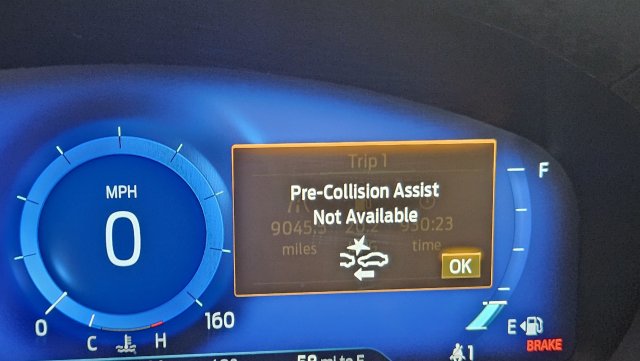
Errer - "Pre-Collision Assist not available" - Need guidance

Messages
70
Reactions
22
Points
7
Location
Lincoln, CA, USA
Vehicle
2021 Explorer ST
#1
Hello All,

Not sure where to start for this error message. "Pre-Collision Assist not available."

Context: I had a V1 plug-in using one of those push-pin taps for power, inserted into the back of the camera plug rather than tapping directly into the wiring. The suction cups for the V1 failed, and it fell down and dangled by the wire. That is when the message appeared. I checked the plug going into the camera, and it was tight and secure. I then removed the V1.

So my question is.

I checked FUSE 34, which is what I see is associated with the camera/cruise control. As that is fine, does the camera need to be "recalibrated" based on what the dealer said?

Or options?

Thanks in advance.
 

2020FordRaptor

3000 Post Club
Messages
3,065
Reactions
1,359
Points
252
Location
Nevada
Vehicle
'20 Raptor, '22 Explorer ST, '14 GT500, '03 F150
#2
Camera doesn’t need to be recalibrated. Did you make sure the windshield is clean in front of the camera?
 

OP
M
Messages
70
Reactions
22
Points
7
Location
Lincoln, CA, USA
Vehicle
2021 Explorer ST
Thread Starter #3
It's not a visibility issue. The issue pops up as soon as I start the car.
 

Attachments

GearHead_1

1000 Post Club
Messages
1,906
Reactions
1,622
Points
262
Location
Utah
Vehicle
Exploder
#4
Is Active Braking turned off? If so, it will pop up every time it is started but should go away.
 

OP
M
Messages
70
Reactions
22
Points
7
Location
Lincoln, CA, USA
Vehicle
2021 Explorer ST
Thread Starter #5
Yes tried that and still get the message. The only thing I can think is when the radar detector fell, it shorted the camera or did something to un-calibrate it. Based on what I read, it can happen when windshields are replaced. Trying to avoid the dealership if I can fix it on my own.
 

Dale5403

2000 Post Club
Messages
2,310
Reactions
2,567
Points
352
Location
Mondovi, WI, USA
#6
If you think it is the camera call an auto glass company near you.
 

OP
M
Messages
70
Reactions
22
Points
7
Location
Lincoln, CA, USA
Vehicle
2021 Explorer ST
Thread Starter #7
I don't know if it is the camera. Why am I asking if anyone has any ideas to try based on what happened?

This is also linked to cruise control, so with this erro,r there is no cruise control.
 

GearHead_1

1000 Post Club
Messages
1,906
Reactions
1,622
Points
262
Location
Utah
Vehicle
Exploder
#8
I think what you are suggesting is probably the right track. That said, just for grins and giggles I might pull the battery cable for 30 minutes.
 

OP
M
Messages
70
Reactions
22
Points
7
Location
Lincoln, CA, USA
Vehicle
2021 Explorer ST
Thread Starter #9
will give the battery pull a try and report back.
 

Messages
262
Reactions
127
Points
37
Location
Massachusetts
Vehicle
2023 ST
#10
Before you disconnect the battery

I'd hook up ForScan, or a good OBD2 scanner that can read module-based DTC's and see what the modules are spitting out for DTC's.

SInce the warning comes on right as you turn the car on, it's likely a hard fault. One of the related modules will have a DTC set and if you post that, it might give us a better starting point vs guessing

My guess (yes i'll throw one out there) is that when the V1 fell down, it likely tugged the power connection for the camera out of the connector and you've now lost power to the camera. It could have been a temporary condition, but it will be stored as a module DTC. I'd unplug the connector and check for power on the contact side of the connector. DOesn't take much for those pins to get pulled back slightly and not make contact.

You can reset all the module DTC's through Forscan and then see if the hard fault comes back rather than a battery reset.
 

Last edited:

EDWYER

Active Member
Messages
531
Reactions
255
Points
52
Location
NC
Vehicle
Black 2020 ST
#11
It's not a visibility issue. The issue pops up as soon as I start the car.
Still worth making sure it's clean. It can trigger/fault the sensors.
 

Messages
91
Reactions
23
Points
7
Location
United States
Vehicle
Explorer ST
#12
I've had this same error ever since I installed my intercooler over a year ago. Obviously different cause than OP's but still annoying as it prevents me from being able to use cruise control.

I've taken the bumper off a few times to ensure all plugs are properly seated. I think the sensor in the front bumper somehow got misaligned and that's causing my problem. Though it looks like a very expensive fix so I just live with the error popping up every time (and without cruise control as well).
 

OP
M
Messages
70
Reactions
22
Points
7
Location
Lincoln, CA, USA
Vehicle
2021 Explorer ST
Thread Starter #13
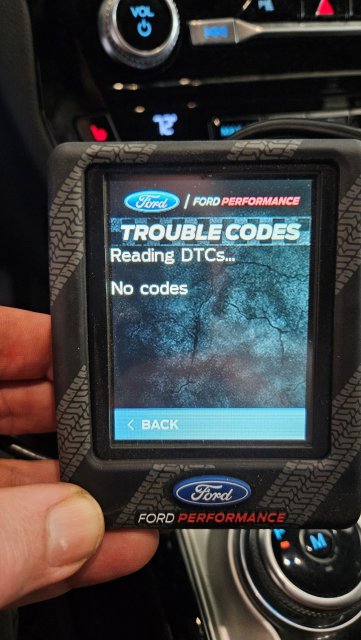
OK, so I unplugged the battery for 60 min then re-connected. The issue still happens.

My programmer shows no codes.
 

Attachments

Messages
364
Reactions
201
Points
37
Location
Ashburn, VA
Vehicle
2020 Explorer ST
#14
Proceed at your own risk-
My friend had this error (conveniently after picking up after a service). He brought it back to the dealer and the small plastic bracket securing the radar sensor in the bottom middle of the front bumper had magically broken, so the sensor was basically hanging there and could move around slightly, causing the error. The dealer wanted some crazy $$ to repair it. I used forscan to disable the forward collision warning and problem is 'patched'. He said he doesn't care b/c he doesn't use the cruise control anyway.
 

Messages
262
Reactions
127
Points
37
Location
Massachusetts
Vehicle
2023 ST
#15
OK, so I unplugged the battery for 60 min then re-connected. The issue still happens.

My programmer shows no codes.
You are likely only reading ECU codes with that programmer. It won’t scan the other modules for DTCS, as that’s where the error is likely stored.

Really need to scan with ForScan or a higher end scan tool that can read all module DTCs
 

Explorer ST Posts


Top