• Sign Up! To view all forums and unlock additional cool features

    Welcome to the #1 Explorer ST Forum and Explorer ST community dedicated to Explorer ST owners and enthusiasts. Register for an account, it's free and it's easy, so don't hesitate to join the Explorer ST Forum today!


Forscan Amber modification

Brackneyc

New Member
U.S. Army Veteran
Messages
8
Reactions
2
Points
2
Location
IL
Vehicle
2025 explorer st
#1
Not sure where Forscan issues get posted.
We have 2 2025 explorer STs.
I did the amber DRL change in Forscan.
Changed the values according to the spreadsheet.

Neither explorer has fog lights now. I even changed the values back to the factory setting, and still no fog lights.

What the heck did I do here. Is there a fix.
I’ve not heard of this being an issue with this change.

Any help is appreciated.
 

2020FordRaptor

2000 Post Club
Messages
2,929
Reactions
1,310
Points
252
Location
Nevada
Vehicle
'20 Raptor, '22 Explorer ST, '14 GT500, '03 F150
#2
Dumb question, but you’re pushing the button for fog lights right?
 

OP
B

Brackneyc

New Member
U.S. Army Veteran
Messages
8
Reactions
2
Points
2
Location
IL
Vehicle
2025 explorer st
Thread Starter #3
Yes. The icon is showing on the dash that they’re on.
 

2020FordRaptor

2000 Post Club
Messages
2,929
Reactions
1,310
Points
252
Location
Nevada
Vehicle
'20 Raptor, '22 Explorer ST, '14 GT500, '03 F150
#4
Yes. The icon is showing on the dash that they’re on.
And you were updating the stock file back on?
 

OP
B

Brackneyc

New Member
U.S. Army Veteran
Messages
8
Reactions
2
Points
2
Location
IL
Vehicle
2025 explorer st
Thread Starter #5
I haven’t yet. But am planning to.
 

Combatvet

Member
U.S. Army Veteran
Messages
240
Reactions
115
Points
37
Location
Texas
Vehicle
2025 Explorer ST
#6
Did you know that the vehicle has to be in drive to see the amber DRL's?
 

OP
B

Brackneyc

New Member
U.S. Army Veteran
Messages
8
Reactions
2
Points
2
Location
IL
Vehicle
2025 explorer st
Thread Starter #7
Yes, I am aware of that. The ambers are working perfectly.

I did my homework before I changed those two lines.

For some reason, the changes seem to be hit and miss. Other owners have reported different issues as well.
 

Cdubya

2000 Post Club
Messages
2,020
Reactions
1,024
Points
352
Location
NE Ohio
Vehicle
2026 Explorer ST
#8
Not sure about fogs when in auto but when I want the fogs with amber, I switch the headlights to mode 2.
 

CBettis70

New Member
U.S. Army Veteran
Messages
7
Reactions
2
Points
2
Location
Appleton Wisconsin
Vehicle
2025 Ford Explorer ST
#9
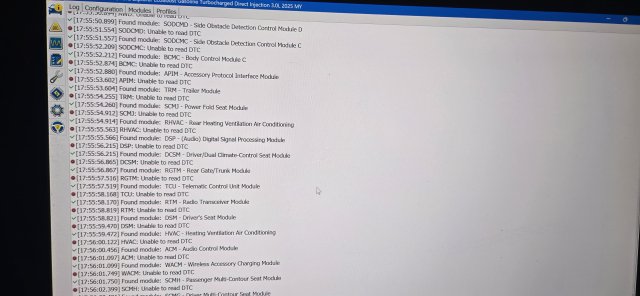
I followed everything and no success, to include the enabling US mode and now I cant access any modules to return to original. 20260207_175629.jpg
 

Messages
2,929
Reactions
1,310
Points
252
Location
Nevada
Vehicle
'20 Raptor, '22 Explorer ST, '14 GT500, '03 F150
#10
I followed everything and no success, to include the enabling US mode and now I cant access any modules to return to original. View attachment 33808
Like you can’t load the backup files back on?
 

CBettis70

New Member
U.S. Army Veteran
Messages
7
Reactions
2
Points
2
Location
Appleton Wisconsin
Vehicle
2025 Ford Explorer ST
#11
Like you can’t load the backup files back on?
I tried but could not figure out how to do it. When I hit play for the BCM, an error occurs and it will not load. I read that I have to delete the profile on FORSCAN, let it load again then with internet, load the factory stuff back in. Supposed to be a radial button at the bottom to load as built. I will try it. Everything works on the vehicle which is strange. It is my only mode of transportation to work at the moment because of the snow. I am not bringing my Mustang out in the weather here lol!
 

Cdubya

2000 Post Club
Messages
2,020
Reactions
1,024
Points
352
Location
NE Ohio
Vehicle
2026 Explorer ST
#12
Yeah, there is something wrong if it can't read the modules. After you rescan and the module config can be displayed, you would just load the old settings from the file saved and then write it to the car.
 

Last edited:


Top